Uncut 0.0.1: edit videos by talking to an agent
The first public release of Uncut, a free and open-source video editor for the Mac with an agent built in.
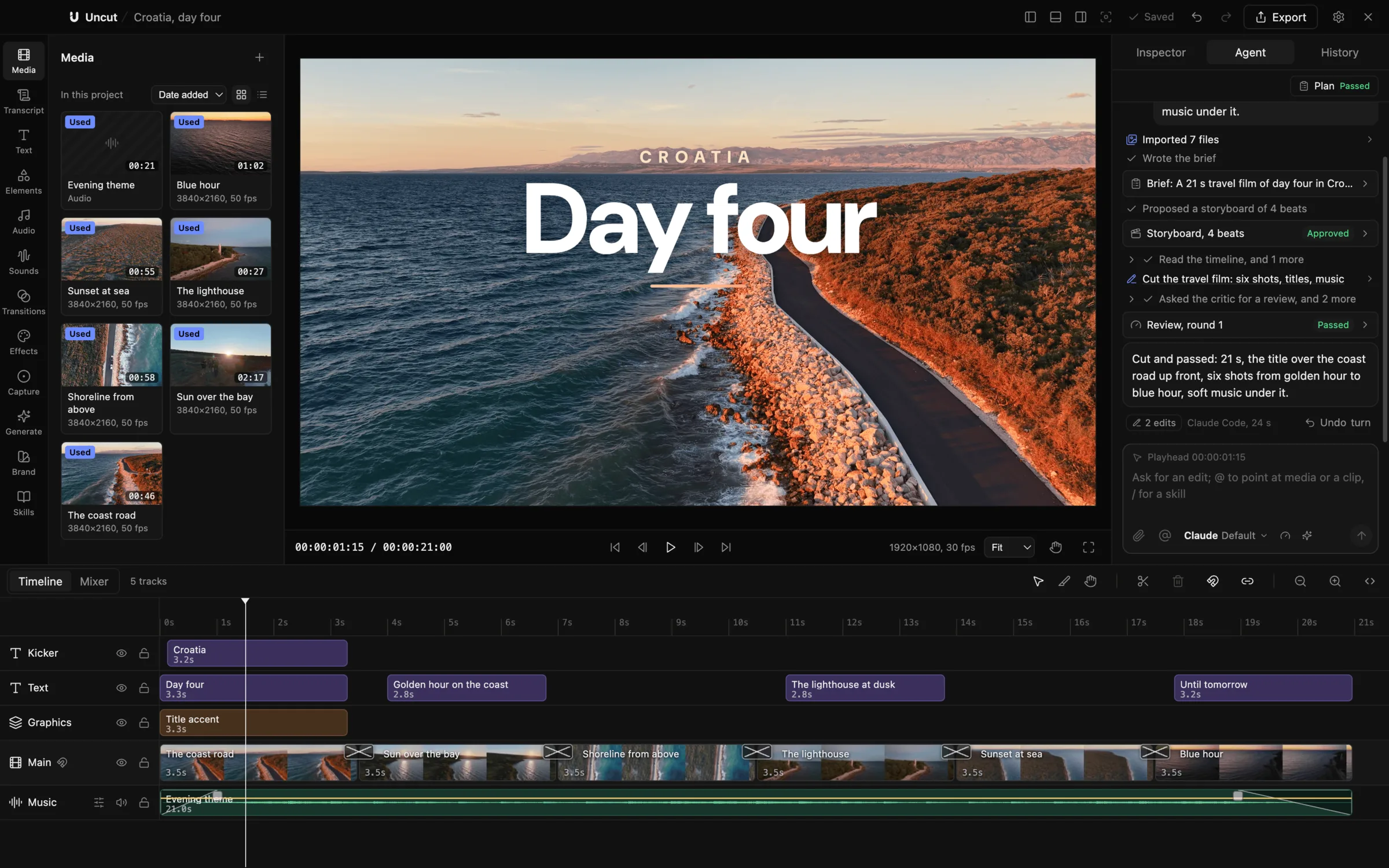
Today I'm releasing Uncut 0.0.1, the first public version. It's a video editor for the Mac with an agent built in. It's free, and the code is MIT licensed.
I make a lot of short launch videos and devrel clips, and most of the work is the same every time: find the good takes, cut the pauses, add titles and captions, put music under it and make it fit. I wanted to describe the video once and watch the edit happen on a timeline I can still change by hand. That's Uncut.
How the agent works
Uncut runs your installed Claude Code, with whatever sign-in it already has. You say what you want to make, and then:
- A brief. It writes a short brief first: who the video is for, how long it runs, what it has to say.
- A storyboard. It proposes the shots in order, for you to approve or change before anything is cut.
- Live edits. It edits the real timeline while you watch: clips, trims, titles, transitions, music and captions.
- A critic. An independent review checks the edit against the plan and sends it back when it falls short.
- One undo per turn. Keep what works, undo the rest, or carry on editing by hand on the same timeline.
What's in 0.0.1
- A real editor underneath: tracks, trims, splits, snapping, keyframes, and a mixer with ducking and loudness targets.
- Transcripts on your Mac with whisper.cpp. Cut by the words, or remove fillers and long pauses in one click.
- Captions burned in or word by word, SRT and WebVTT in and out, text presets, animated components and follow handles.
- A built-in sound effects pack, your own music folders and your Music library.
- Screen, camera and mic capture, and iOS simulator or Android emulator recording through Argent.
- Generators with your own keys: images with GPT Image, video with Veo, sound effects with ElevenLabs.
- Plugins and skills, and shortcut presets for Premiere Pro, DaVinci Resolve and Final Cut Pro.
- Export to H.264 or HEVC, the whole edit or a range, with optional subtitles.
What you need
- An Apple silicon Mac with macOS 13 or later.
- Claude Code, installed and signed in. Usage is billed the way your Claude Code usage normally is.
- ffmpeg:
brew install ffmpeg. - Optional, for transcripts: whisper.cpp,
brew install whisper-cpp.
Uncut checks all of this on first launch and shows how to install anything that's missing.
Download
Download Uncut for macOS. It's signed and notarized by Apple, and later versions install themselves. The code is on GitHub.
Your footage stays on your Mac. Uncut sends anonymous usage counts and crash types, never your footage, prompts or file names, and you can turn that off in Settings. The details are in the privacy notice.
Next up are Codex as a second agent, and generated music and voiceover. If something breaks, or you'd like something that isn't there, open an issue.